Running Queries
Query Syntax
Primer
The example below illustrates the basic structure of a WeaveQ query.

Queries always begin with the #from keyword, denoting the start of
the first or “seed” step that retrieves an initial set of data. This is
followed by one or more subsequent “pivot” or “join” steps.
All steps must specify a data source in the form of a string enclosed in quotes. The format of this string is as follows:
<resource type>:<resource name>
Where <resource type> is one of the following:
| Resource Type | Description | Resource Name |
|---|---|---|
| csv | A comma-separated values file in UTF-8 encoding. Each row will be treated as a separate record | Path to a CSV file |
| js | A JSON file containing an array of objects at its root. Each object in the array will be treated as a separate record | Path to a JSON file |
| jsl | A “JSON lines” file containing line-separated JSON objects | Path to a JSON lines file |
| el | Elasticsearch query | Elasticsearch index name |
After the data source string, the compulsory #as keyword is used to
assign an alias to the data source so that it can be referred to later
in the query.
The final part of the step is the #where clause. This is where the
relationships between fields in the current and previous step’s data
sources are defined so that WeaveQ can determine how to perform the
pivot or join operation.
Field relationships can currently only be expressed in terms of equality
(using the = operator) or inequality (using the != operator).
Multiple field relationships can be expressed using logical and and
or operators to create complex expressions. For example:
... #where (b.color = c.color and b.make != c.make) or b.speed = c.speed
You can refer to fields in sub-objects by chaining names separated by dots together:
c.roof.color
Filters
For data sources that support it (currently only the Elasticsearch data
source), you can also specify a filter string using the #filter
keyword after the data source alias.
How the filter string is used is specific to the data source. The Elasticsearch data source treats it as an Elasticsearch Query String Query, passing it to an Elasticsearch instance for controlling which documents are returned to WeaveQ. For example, the following will cause Elasticsearch to find all cars made by Honda:
#from "csv:bikes.csv" #as b #pivot-to "el:cars" #as c #filter |make:"honda"| #where b.color = c.color
The filter string is enclosed by pipe (“|”) characters. If you need to
include a pipe in the filter string, escape it with a backslash (i.e.
\|).
Step Options
The join step accepts several options that can be used to modify its default behaviour:
| Option | Description | Arguments |
|---|---|---|
| #exclude-empty | Don’t output records from the step’s data source that haven’t had a record joined to them | None |
| #field-name | Specifies the name of the field to store joined records in. If this option is not specified, a default field name of “joined_data” is used | A name for the field (not enclosed in quotes) |
| #array | Specifies that the joined field must be an array. If multiple records are eligible to be joined to the same record, specifying this option will result in them being appended to the array. If this option is not specified, only the first record eligible to be joined to another will successfully be joined - subsequent records will be discarded | None |
Options are specified after the #where clause. For example:
... #where b.color = c.color #field-name car #exclude-empty #array
Query EBNF
The EBNF grammar below describes the WeaveQ query syntax, with some minor approximations for the sake of simplicity.
identifier     = { alphanum | "_" | "." | "@" | "$" | "?" } ;
literal        = '"', { anychar - '"' }, '"' ;
comparison-ops = "=" | "!=" ;
field-relation = identifier, comparison-ops, identifier ;
logical-ops    = "and" | "or"
field-expr     = { field-relation [logical-ops field-relation] } ;
where-clause   = "where", field-expr ;
filter-expr    = '|', { anychar - '|' }, '|' ;
source-spec    = literal, "#as", identifier, ["#filter", filter-expr] ;
pivot-clause   = "#pivot-to", source-spec, where-clause ;
join-options   = ["#field-name", identifier], ["#exclude-empty"], ["#array"] ;
join-clause    = "#join-to", source-spec, where-clause, join-options ;
process-clause = pivot-clause | join-clause ;
seed-clause    = "#from", source-spec ;
query          = seed-clause, {process-clause} ;
How Queries Work
A query is made up of a set of steps that run one after the other from left to right.
The first step is called a “seed” step. Its only purpose is to retrieve an initial set of records the next step will use as one of its inputs.
All subsequent steps are either “pivot” or “join” steps. They take 2 inputs: the output of the previous step and the output of the step’s data source. They produce 1 output: the result of processing the two inputs according to relationships between record fields as defined in the query. The nature of this output depends on the type of step, the field relationships defined in the query and any options specified for the step.
Field Relationships
Relationships between record fields are expressed as logical statements associating fields from the step’s data source with fields from the previous step’s output.
Consider, for example, a step whose data source contains network information about observed IP addresses that is to be correlated with another data source containing IP addresses known to send spam.
The field relationship expression for this step might be as follows:
spam.ip = network.src_ip or spam.ip = network.dest_ip
Currently, WeaveQ only supports relating fields by equality (=) and
inequality (!=).
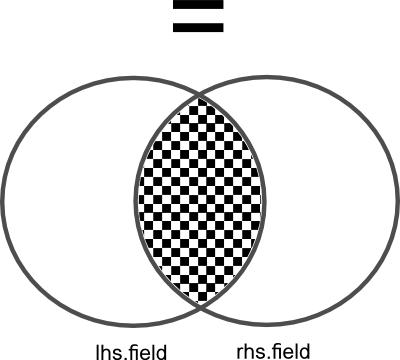
How field values select records for output by pivot steps when related by equality.
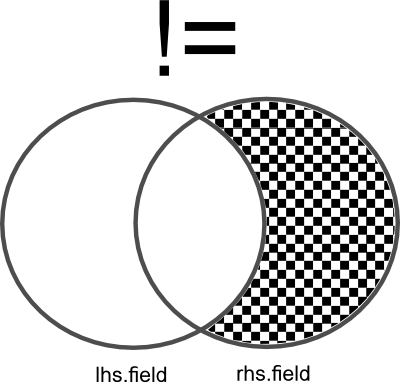
How field values select records for output by pivot steps when related by inequality.
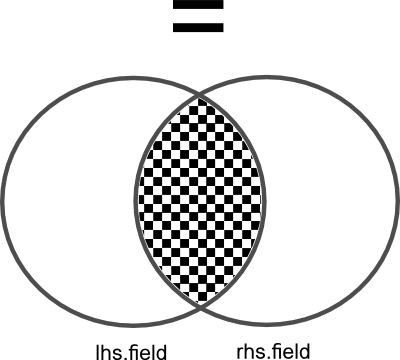
How field values select records eligible for being joined to join step results when related by equality.
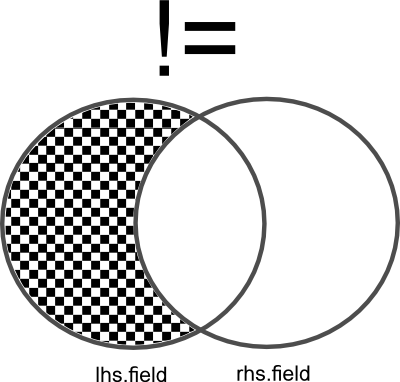
How field values select records eligible for being joined to join step results when related by inequality.
Pivot Steps
A pivot step outputs the records from its data source that are related to the records in the output of the previous step according to the field relationships defined.
A pivot step’s output is always a subset of the records provided by its data source. Records in a pivot step’s results never include records from the previous step’s output.
Join Steps
A join step merges the records from the output of the previous step with the records from its data source according to the field relationships defined.
By default, join steps will output all records from their data source, even
ones that haven’t had anything joined to them. You can cause the step to only
output records that have resulted in a join by specifying the
#exclude-empty switch in the query.
WeaveQ will not overwrite existing fields when performing a join. Instead,
the data to be joined will be discarded. As a result, you should make sure
that the name of the field used to contain joined data is either not in use
(using the #field-name option) or it is treated as an array (using the
#array option).